One-Time Passcode (OTP, formerly known as Multi-Factor Authentication) is a security measure that will help verify your donors' identity and safeguard their payment details.
NOTE: PayPal, Venmo, and Digital Wallet payment options (such as Apple Pay and Google Pay) have their own integrated authentication methods, which allow them to bypass OTP. This makes them a suitable alternatives for donors experiencing issues receiving their code.
Click here to learn more about the different payment options available through your forms.
One-Time Passcode Trigger Locations
Donors will be prompted with the SMS OTP after submitting any donation form in your account. The Mobile Number field will become required on all active donation forms across your account.
IMPORTANT:
- If the Mobile Number field is hidden by default with a dynamic action on your form, the form will be blocked from taking donations because the phone number field is required for SMS OTP.
- If "Org as donor" is turned on the form, then the SMS message is sent to the Primary contact's phone number
- When someone selects a country other than the US, the mobile field is hidden, and SMS OTP is bypassed for all the gateways.
User Experience (SMS)
Once a donor clicks the Submit button at the bottom of a payment form, a time-sensitive numeric code is sent to the phone number that's been entered on the form (10-minute validity).

Errors are displayed for incorrect or expired codes. The resend code option is available, invalidating the previous code.
Once the correct code is entered, the donor will be taken to the confirmation page.
NOTE: This feature excludes Apple Pay and Google Pay. PayPal, Venmo, and Digital Wallet payment options (such as Apple Pay and Google Pay) have their own integrated authentication methods, which allow them to bypass OTP. This makes them a suitable alternative for donors experiencing issues receiving their code or other challenges.
User Experience (Email)
The Email Address is a required field on all payment forms. Donors will always need to enter their email address in order to complete a donation and receive an email receipt for their gift.
If Email OTP is enabled in lieu of SMS OTP, when a donor clicks the Submit button at the bottom of a payment form a time-sensitive numeric code is sent to the email address entered on the form.

Once the code is entered, the donor will press the Enter button to be directed to the confirmation page.
The Importance of OTP for You and Your Donors
With a commitment to balancing ease of use with the highest level of security our customers and donors expect, a new One-Time Passcode (OTP) security measure is enabled. This next level of protection will enforce even more security for your donors’ identity and safeguard their personal information when completing payments on the GiveSmart platform.
What This Means for You
When requested, One-Time Passcode (OTP) will be enabled on all existing and future payment forms in your Fundraise account. No additional action is needed on your part.
What This Means for Your Donors
When completing payments on Fundraise forms, donors will be prompted to verify their identity through a one-time code sent to their mobile phone or email address.
FAQs
Why is One-Time Passcode (OTP) important?
- Enabling OTP protects your organization from fraudulent card testing attempts on your payment forms. To learn more about card testing, click here.
Can both SMS and Email OTP be triggered at the same time?
- No - SMS OTP overrides email OTP when enabled, and will always take precedence.
- In order to enable Email OTP, the SMS OTP will need to be explicitly disabled.
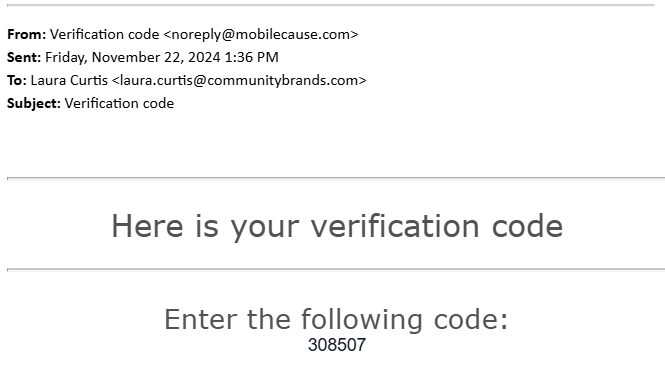
What does the verification code email look like?
- The verification code email will be sent from noreply@mobilecause.com, and will contain the following information.
Is the OTP verification code needed for non-payment forms?
- No, forms that do not support purchases will not need a one-time passcode.
- This includes: surveys, volunteer sign-ups, pledge-only forms, and more.
Is the One-Time Passcode (OTP) still triggered for $0 purchases?
- Yes, if your form can accept payments and non-payments alike (e.g. a 100% off promo code), then the One-Time Passcode workflow will be part of the process for completing the form.
If paying with a digital wallet, is OTP necessary?
- No, payments made via Apple Pay, Google Pay, PayPal, or Venmo will not require OTP.
- Click here to learn more about the different payment options available through your forms.
The donor didn't receive the email, where should they look?
- The email will come from noreply@mobilecause.com. Please instruct the donor to check their spam/junk folder.
Are international numbers supported with OTP SMS?
- International numbers are not supported and cannot receive texts from GiveSmart. However, when someone selects a country other than the US, the mobile field is hidden, and SMS OTP is bypassed
What is the validity of the One-Time Passcode?
- The code is valid for 10 minutes
Can a user resend a code if the code has expired?
- Yes, a user can click the Resend Code link on the pop-up to trigger a new code.
- The former code will not be accepted.